just-desktops.
Keyboard-driven desktops for macOS, in one small background process.
- ⌥1
- ⌥2
- ⌥3
- ⌥Tab
What it does

Switch windows
⌥Tab moves through the windows on this desktop.

Switch desktops
⌥1, ⌥2, ⌥3. Up to 10 desktops.

Float above desktops
Choose apps to keep on every desktop, such as a terminal or a password manager.
Window views
Show the windows on this desktop in one of three ways.
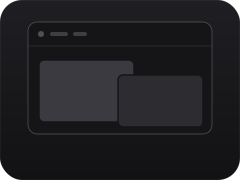
Menu bar
One icon per window and the desktop key. It can also be a single small icon.
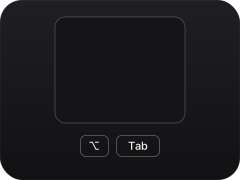
List
⌥Tab lists the app name and title of each window.
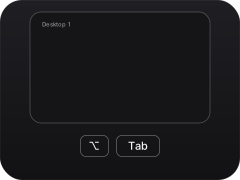
Square
⌥Tab shows each window as a large preview. You can also skip the panel and move with Tab alone.
Also
%20{%20.f,%20.press%20{%20animation:%20none%20}%20.f0%20{%20opacity:%201%20}%20}%20.f0%20{%20animation-delay:%20-1.60s;%20}%20%3c/style%3e%3cdefs%3e%3clinearGradient%20id='bg'%20x1='0'%20y1='0'%20x2='0'%20y2='1'%3e%3cstop%20offset='0'%20stop-color='%231f1f23'/%3e%3cstop%20offset='1'%20stop-color='%23121214'/%3e%3c/linearGradient%3e%3c/defs%3e%3crect%20width='480'%20height='360'%20rx='44'%20fill='url(%23bg)'/%3e%3crect%20x='0.5'%20y='0.5'%20width='479'%20height='359'%20rx='43.5'%20stroke='%23ffffff'%20stroke-opacity='0.08'/%3e%3crect%20x='232'%20y='76'%20width='168'%20height='150'%20rx='12'%20fill='%232c2c31'/%3e%3crect%20x='96'%20y='112'%20width='210'%20height='160'%20rx='12'%20fill='%233a3a40'/%3e%3crect%20x='86'%20y='102'%20width='230'%20height='180'%20rx='22'%20stroke='%23ffffff'%20stroke-width='6'/%3e%3c/svg%3e)
Focus ring. A thin ring around the window you are typing in, so you can see where your keys go. It can be turned off.
What it doesn't do
'/%3e%3crect%20x='0.5'%20y='0.5'%20width='479'%20height='359'%20rx='43.5'%20stroke='%23ffffff'%20stroke-opacity='0.08'/%3e%3crect%20x='120'%20y='88'%20width='240'%20height='184'%20rx='12'%20fill='%233a3a40'/%3e%3cpath%20d='M138.4%20106.4%20L101.6%2069.6'%20stroke='%23ffffff'%20stroke-opacity='0.5'%20stroke-width='3'%20stroke-linecap='round'/%3e%3cpath%20d='M116.4%2070.4%20L101.6%2069.6%20L102.4%2084.4'%20stroke='%23ffffff'%20stroke-opacity='0.5'%20stroke-width='3'%20stroke-linecap='round'%20stroke-linejoin='round'/%3e%3cpath%20d='M123.6%20105.6%20L138.4%20106.4%20L137.6%2091.6'%20stroke='%23ffffff'%20stroke-opacity='0.5'%20stroke-width='3'%20stroke-linecap='round'%20stroke-linejoin='round'/%3e%3cpath%20d='M341.6%20253.6%20L378.4%20290.4'%20stroke='%23ffffff'%20stroke-opacity='0.5'%20stroke-width='3'%20stroke-linecap='round'/%3e%3cpath%20d='M363.6%20289.6%20L378.4%20290.4%20L377.6%20275.6'%20stroke='%23ffffff'%20stroke-opacity='0.5'%20stroke-width='3'%20stroke-linecap='round'%20stroke-linejoin='round'/%3e%3cpath%20d='M356.4%20254.4%20L341.6%20253.6%20L342.4%20268.4'%20stroke='%23ffffff'%20stroke-opacity='0.5'%20stroke-width='3'%20stroke-linecap='round'%20stroke-linejoin='round'/%3e%3cpath%20d='M341.6%20106.4%20L378.4%2069.6'%20stroke='%23ffffff'%20stroke-opacity='0.5'%20stroke-width='3'%20stroke-linecap='round'/%3e%3cpath%20d='M377.6%2084.4%20L378.4%2069.6%20L363.6%2070.4'%20stroke='%23ffffff'%20stroke-opacity='0.5'%20stroke-width='3'%20stroke-linecap='round'%20stroke-linejoin='round'/%3e%3cpath%20d='M342.4%2091.6%20L341.6%20106.4%20L356.4%20105.6'%20stroke='%23ffffff'%20stroke-opacity='0.5'%20stroke-width='3'%20stroke-linecap='round'%20stroke-linejoin='round'/%3e%3cpath%20d='M138.4%20253.6%20L101.6%20290.4'%20stroke='%23ffffff'%20stroke-opacity='0.5'%20stroke-width='3'%20stroke-linecap='round'/%3e%3cpath%20d='M102.4%20275.6%20L101.6%20290.4%20L116.4%20289.6'%20stroke='%23ffffff'%20stroke-opacity='0.5'%20stroke-width='3'%20stroke-linecap='round'%20stroke-linejoin='round'/%3e%3cpath%20d='M137.6%20268.4%20L138.4%20253.6%20L123.6%20254.4'%20stroke='%23ffffff'%20stroke-opacity='0.5'%20stroke-width='3'%20stroke-linecap='round'%20stroke-linejoin='round'/%3e%3cpath%20d='M150.0%20314.0%20L330.0%2046.0'%20stroke='%23161618'%20stroke-opacity='1'%20stroke-width='14'%20stroke-linecap='round'/%3e%3cpath%20d='M150.0%20314.0%20L330.0%2046.0'%20stroke='%23f5f5f7'%20stroke-opacity='0.9'%20stroke-width='4'%20stroke-linecap='round'/%3e%3c/svg%3e)
No resizing, tiling or layouts. Windows keep their size and position. Use Raycast or another tool for that, or AeroSpace for tiling.
No colors or styles for the border. For that, use JankyBorders.
Install
App
Homebrew
brew install --cask n-seiji/tap/just-desktops- •On first launch it asks for Accessibility. Allow it.
- •To start at login, choose Launch at Login in its menu.
Command line
mise
mise use -g github:n-seiji/just-desktops
just-desktops- •Grant Accessibility to just-desktops itself, not to the terminal. To start at login, see the README's Command line section.